The One-Page Revolution: How to Fix Your Curriculum Chaos in 45 Minutes
Walk into almost any school, and you’ll find the same digital ghost town: folders titled "Unit 3 FINAL v2," broken assessment links, and standards documents buried so deep in a shared drive that they might as well be classified.
I recently asked a third-grade team to pull up their current unit assessment. Five minutes later, four teachers were staring at four different versions, debating which one was actually "live."
This isn’t a teacher problem. It’s a systems problem.
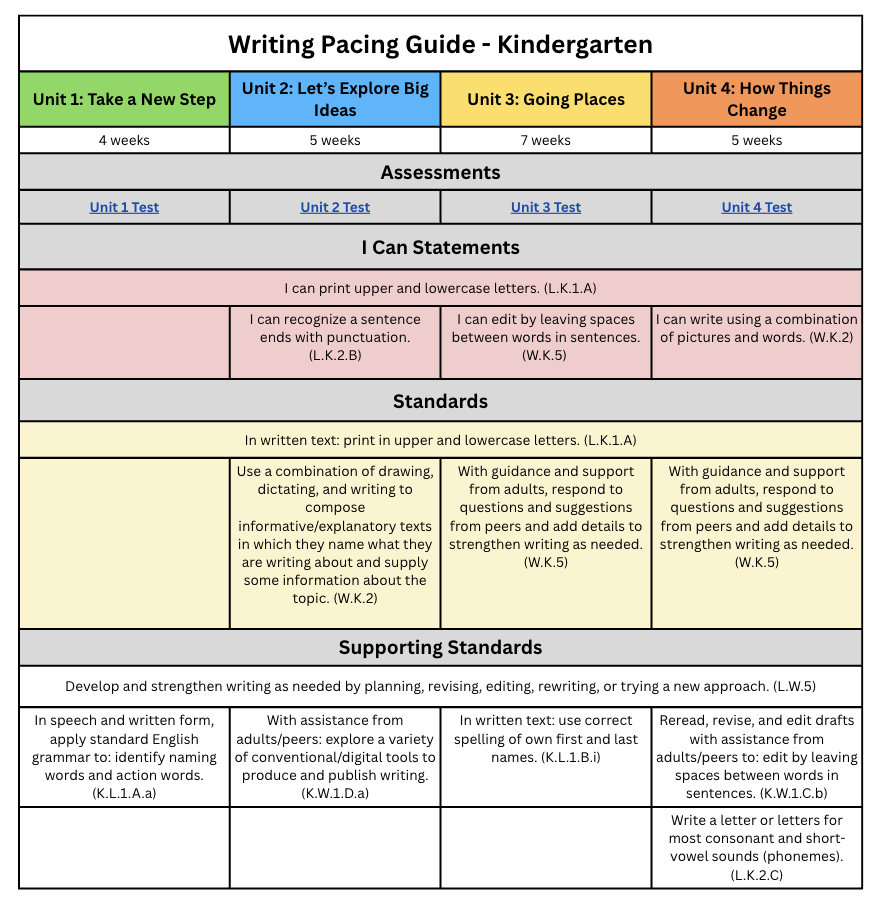
A sample Curriculum Management One Pager for Kindergarten
The solution isn't another expensive software platform with a new password to forget. The solution is what I call a Curriculum Management System—but you can just call it your "Teaching Dashboard." It’s an organized, one-page Google Sheet that acts as the "GPS" for the entire school year.
The Problem: We’re Teaching Without a Map
According to a survey of Missouri teachers, 74% reported they either had no pacing guide or had one that didn't actually include state standards. We are asking teachers to do one of the most important jobs in society without a map of where they are going.
When we don't have a central "landing page," chaos ensues:
New teachers are left guessing.
Veteran teachers get stuck in silos.
Students miss out on "guaranteed" curriculum because standards are invisible.
The Solution: The One-Page Dashboard
Imagine a single, scrollable Google Sheet. It doesn't just list units; it links everything.
The Instructional Window: Exactly when the unit happens.
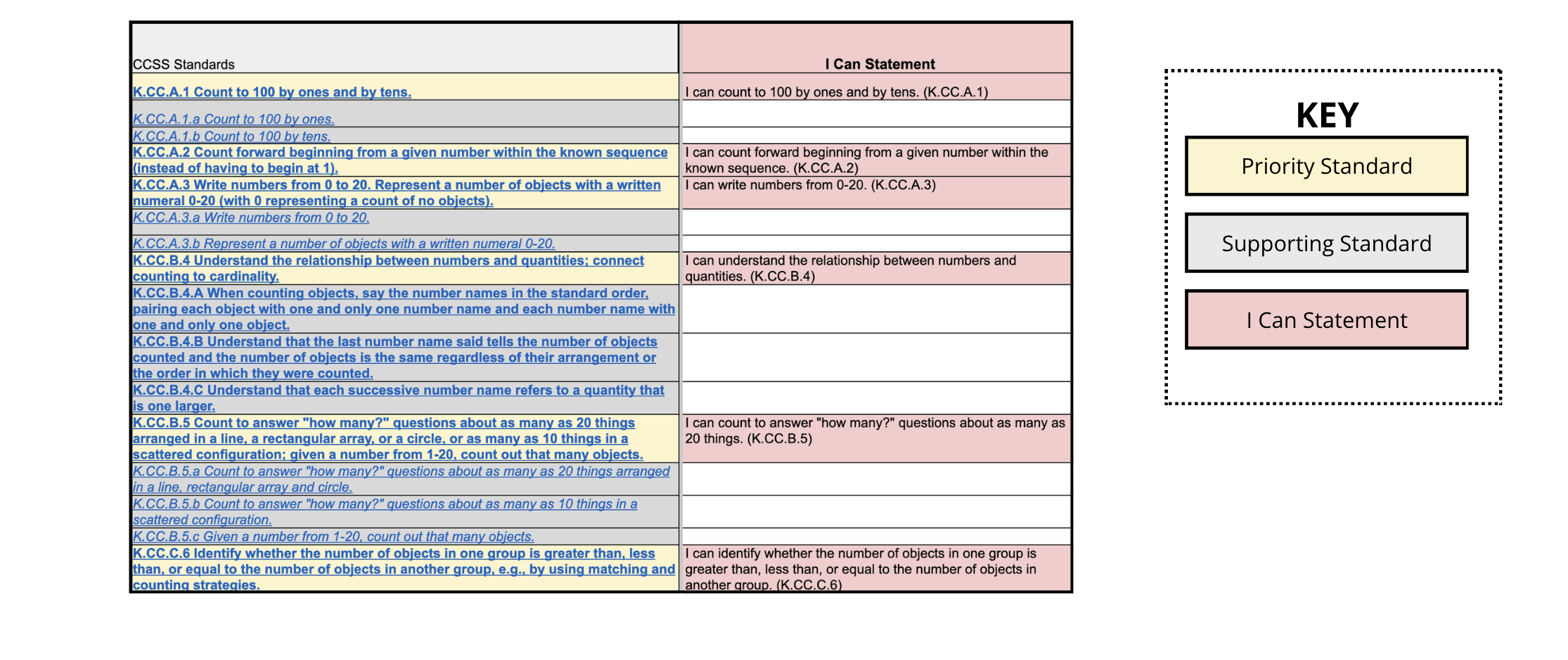
Priority vs. Supporting Standards: Knowing where to do a "deep dive" versus a "surface swim."
Hyperlinked Everything: One click takes you to the assessment, the "I Can" statements, and the key state documents.
Why Google Sheets?
I’m often asked why I don't recommend fancy curriculum software. The answer is simple: The best system is the one teachers will actually use. Google Sheets is free, collaborative, and requires zero IT approval. It’s "low-tech, high-impact."
The Secret Sauce: The Standards Audit
Identifying your standards is Step A. But Step B is the Audit, and this is where the real transformation happens.
Auditing is simply checking: Does what I’m teaching actually match what the state is assessing?
I once worked with a veteran Government teacher who discovered that eight priority standards—the heavy hitters on the state exam—were only being taught in a single two-week window. He wasn't a bad teacher; he just didn't have the visual clarity to see the gap. In thirty minutes of auditing, he reorganized his year. He went from guessing to knowing.
How to Audit Your Year in 3 Steps:
Create a Master List: Get every standard into one tab. Color-code the Priority Standards (the non-negotiables that are foundational for future learning).
Map it Out: Copy and paste those standards into your pacing guide. Check them off your master list as you go.
Find the Gaps: Any unchecked boxes? Those are your "danger zones"—standards your students will be tested on that you currently aren't covering.
Stop Reinventing the Wheel
We don’t need more meetings; we need more clarity. When we audit our curriculum, we aren't throwing away a teacher's hard work. We are honoring it by ensuring that work actually leads to student success.
An audited, one-page system makes teaching easier and faster. 83% of teachers I’ve worked with say this method is easier than anything they’ve tried before.
Are you ready to trade the "FINAL v2" folders for a system that actually works?
Reflection Question for Your Next Team Meeting:
If a new teacher started in your building tomorrow, could they find every priority standard, assessment, and resource for the year in under sixty seconds? If not, it’s time to audit.